




Breadcrumb
The Writing Studio
The Writing Studio provides free writing support at any stage of the writing process.
We will work with you on many kinds of writing projects and tasks, including brainstorming, crafting a thesis statement, tackling your senior thesis, revising a biology lab report, and improving your grammar and punctuation.
We can help you with any project that involves communicating ideas to an audience. While that includes essays and other traditional writing assignments, we can also help with slide presentations, videos and screencasts, poster presentations, interview questions, infographics, speeches and podcasts, and other multimodal projects.
We also help with resumes, cover letters, personal essays for scholarships and graduate school, and much more.
Here for a Writing Studio Zoom session? Use this link. If no one is there after 5 minutes, call the Learning Center Reception Desk at 707-826-5217.
Locations
In-Person Location
Library 1st Floor
Zoom Location
Learning Center Virtual Front Desk
Email-based consultations
Available during all open hours; submit your work using this online form.
Contact & Hours
Follow us
Instagram: @HumboldtWritingStudio
Schedule your in-person, Zoom, or email consultation through our online scheduling system
Hours:
Mondays : 12 - 7pm
Tuesdays & Wednesdays : 11am - 7pm
Thursdays : 11am - 8pm
Fridays : 11am - 4pm
Choose Your Writing Studio Session
In - Person
In-Person Consultations
- 50-minute in person consultations in the Learning Center on the Library 1st Floor. Schedule a session to guarantee your spot or drop in (depends on availability).
Zoom
Zoom Consultations
- 50-minute live consultations using Zoom. Schedule a session to guarantee your spot or drop in (depends on availability).
Over Email
Email-Based Consultations
- Written feedback on your draft returned within 8 hours of your appointment.
- Schedule your appointment and then submit your draft using the online form.
Quick writing-related question? Email us at writingstudio@humboldt.edu during open hours.
Make An Appointment NOW!
Step 1
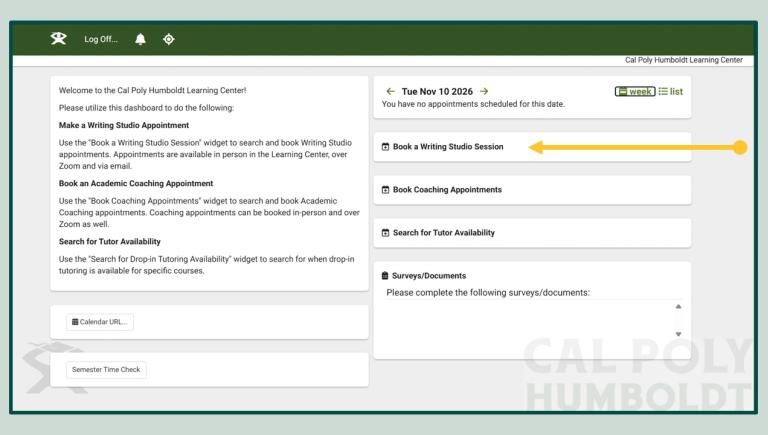
After Navigating to Humboldt's TracCloud website, head to the "Dashboard". Once there, select the "Book a Writing Studio Session" widget.
Step 2
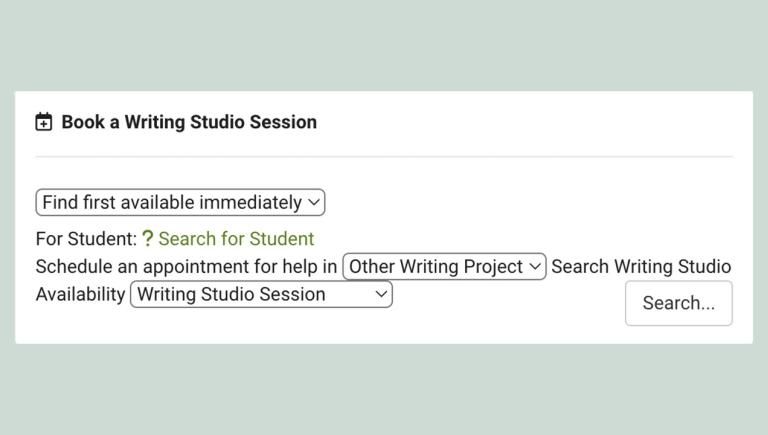
Within the "Book a Writing Studio Session" widget, enter your information to find available appointment times.
Click on the phrase "Search for Student" and enter the first part of your Humboldt email without the '@humboldt.edu' (e.g. xyz987).
Next, let us know what subject your appointment will be for by selecting it from the drop-down labeled "Other Writing Project". If you need help with a project for a class not listed, a resume, grad school application, etc. feel free to keep the subject as 'Other Writing Project'.
Lastly, hit "Search..."
Step 3
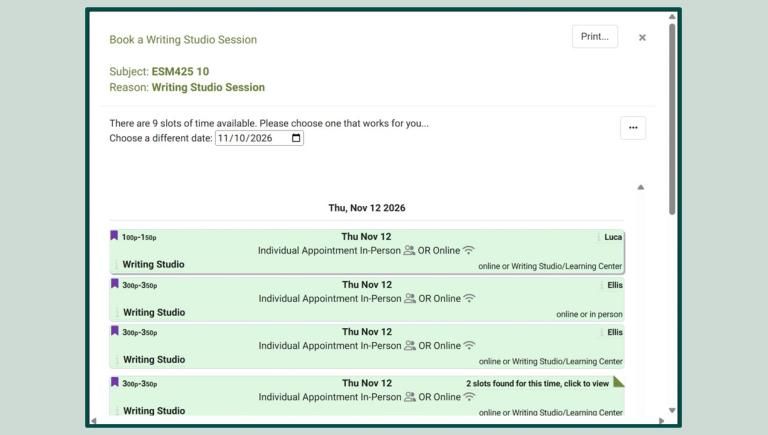
To find an appointment slot, feel free to choose the date that would best work for you using the "Choose a different date:" tool. Once you do this, all available appointment times for that day will appear as green boxes with the Time in the top left corner and the Consultant name in the top right.
Select a green box to continue.
Step 4
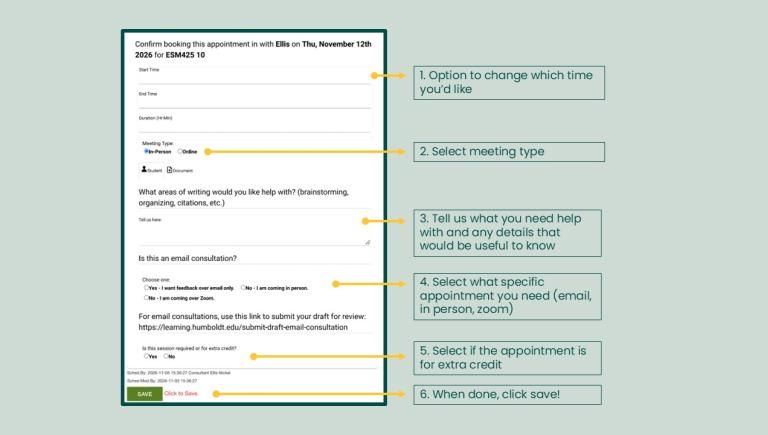
Lastly, fill out these meeting options.
Select "In-Person" if you will be showing up to the Learning Center (Library 1st Floor). Select "Online" if you would like a Zoom meeting or consultation via Email.
Tell us all relevant details for your meeting in the "What areas of writing would you like help with?" section.
Let us know if you would like an Email Consultation by selecting "Yes - I want feedback over email only." If you do not want an email consultation, please select the correct modality of your meeting.
If you are visiting the Writing Studio for Extra Credit, let us know by selecting "Yes."
Click "SAVE" to confirm your appointment.
Need Scheduling Help?
If you would like help scheduling an appointment and/or are facing accessibility-related barriers with TutorTrac, you can schedule a session by contacting Reception at 707-826-5217 or by going to our Reception Desk on the Library 1st Floor. Check the main Learning Center page for Reception hours.
We look forward to working with you!
Check it out below!